Future AI PowerPoint
If you've ever spent hours tweaking slide layouts—adjusting gradients, repositioning icons, or wrestling with inconsistent spacing—you’ll appreciate how Future AI PowerPoint cuts straight to clarity. It’s not just another template. It’s a thoughtfully assembled toolkit for professionals who need to communicate complex ideas—AI strategy, machine learning roadmaps, cybersecurity frameworks—with visual authority and zero friction.
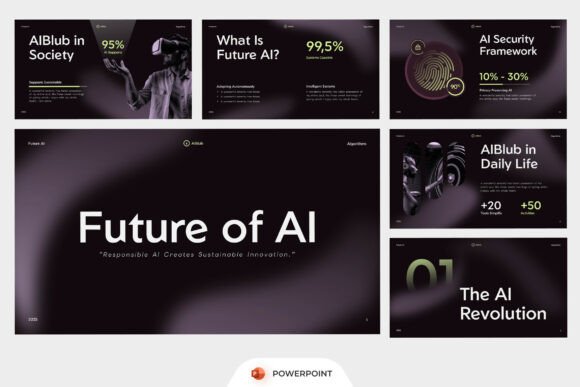
The aesthetic is unmistakably forward-looking: deep indigo-to-charcoal gradients, subtle circuit-line textures, dashboard-style data visualizations rendered in crisp vector form, and modular infographic sections built around threat modeling, algorithm flow, or automation metrics. There’s no “futuristic” cliché here—no neon grids or floating holograms. Instead, it leans into restrained sophistication: clean negative space, purposeful asymmetry, and typography that breathes without shouting. That restraint is intentional. It lets your content—not the design—anchor attention.
A Template Built for Real Presentations, Not Just Pretty Slides
Future AI PowerPoint was designed for people who present to stakeholders who actually read slides. Think CTOs scanning architecture diagrams, investors evaluating scalability claims, or product teams aligning on sprint priorities. Every layout serves a functional role: a security comparison matrix isn’t decorative—it’s built to hold layered threat vectors side-by-side; an automation workflow slide includes editable swimlanes so you can map human vs. bot handoffs without rebuilding from scratch.
Because all slides are fully editable in standard PowerPoint (no plugins, no cloud dependencies), you’re never locked into someone else’s vision. You can replace placeholder stats with real KPIs, swap out icon sets for your brand’s visual language, or adjust color stops in the gradient backgrounds to match your company’s dark-mode UI. The included help guide walks through layer naming conventions and smart object grouping—practical details most templates ignore but designers rely on daily.
Typography That Supports, Not Distracts
The package includes a free, modern sans serif font—clean, neutral, and highly legible at both small annotation sizes and large headline weights. It’s not a display font meant for logos or hero banners; it’s a workhorse typeface optimized for readability across devices and contexts. On screen, it renders crisply even during Zoom share sessions. In printed handouts, it holds weight without bleeding or thinning unpredictably.
This matters more than it sounds. A misjudged font choice can quietly erode credibility: too light, and your security metrics look tentative; too condensed, and your blockchain consensus diagram feels cluttered. The included font avoids those pitfalls. Its x-height is generous, its letter spacing open, and its punctuation marks—especially colons and parentheses—render cleanly in technical contexts where precision signals competence.
Where This Template Fits Naturally
You don’t need to be building AGI to benefit from Future AI PowerPoint. Its flexibility shows up in unexpected places:
- Digital agencies use it for client-facing tech stack overviews—replacing generic stock decks with branded, consistent narratives about cloud migration or AI-augmented CX.
- Cybersecurity firms adapt the threat-modeling slides to visualize zero-trust rollouts or third-party risk assessments—no custom illustration needed.
- SaaS founders build investor pitch decks where dashboard mockups reflect actual product telemetry—not placeholder charts.
- Innovation conference speakers streamline speaker notes and timing cues directly into the slide master, keeping delivery tight and visuals synchronized.
Even non-tech creatives find value: a branding consultant used the modular layout system to map customer journey touchpoints across physical and digital channels; a university lecturer adapted the automation flow slides to explain ethical decision trees in AI governance courses.
Customization Without Compromise
“Fully editable” means more than text boxes you can click. Shapes retain their vector integrity when resized. Icons scale without pixelation. Gradient fills update globally via theme colors—change one swatch, and every background, chart bar, and accent line adjusts in sync. And because the template uses native PowerPoint features (not embedded images or rasterized layers), exporting to PDF preserves interactivity like hyperlinked agendas or annotated speaker notes.
That said, it’s not magic. Stock imagery isn’t included—and that’s by design. You’ll want to source your own photos, illustrations, or screenshots to maintain authenticity. But the template gives you intelligent placeholders: aspect-ratio-locked frames, labeled caption zones, and image masking guides that align with the dark gradient backdrop—so your visuals integrate, not interrupt.
Practical Tips Before You Start
Before diving in, take five minutes to review what’s included beyond the .pptx files. The help guide isn’t filler—it explains how to unlock advanced features like animated transition triggers for multi-step workflows or how to repurpose the AI security infographic as a standalone one-pager for internal training.
Test readability early: project a few slides in a dim room, then again under bright office lighting. Adjust font size or contrast if needed—the base settings assume standard projector brightness, not high-end LED walls. And if you plan to pair the included font with another (say, a subtle serif for quotes or section headers), preview combinations at actual presentation size. Some script fonts look elegant at 24pt on screen but vanish at 18pt on a 100-inch display.
Licensing is straightforward: royalty-free for commercial use, including client work, internal training, and public conferences. No attribution required—but do keep the original file structure intact if you’re sharing editable versions with teammates. That ensures consistency across revisions.
At its core, Future AI PowerPoint respects your time and your audience’s attention. It doesn’t ask you to bend your message to fit a flashy design. Instead, it gives you a precise, adaptable foundation—so your insights land clearly, your data tells a coherent story, and your next presentation feels less like a performance and more like a conversation worth having.