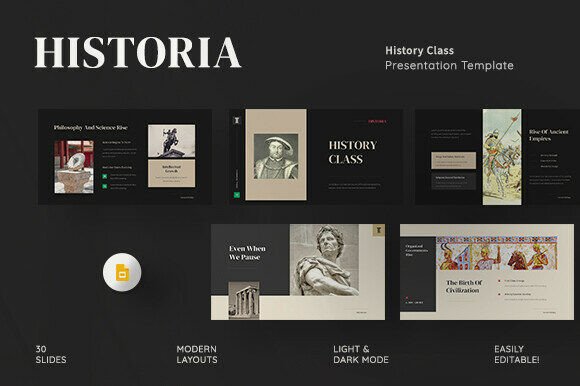
History Class Google Slides Template
Imagine opening a presentation file and immediately feeling the weight—and wonder—of centuries. Not in clutter or confusion, but in clarity: a clean timeline stretching from cave paintings to cloud computing, all framed in warm, retro-modern typography and thoughtful layout. That’s what the History Class Google Slides Template delivers—not just slides, but a narrative scaffold for human history itself.
This isn’t another generic deck with placeholder text and mismatched icons. Historia—the official name behind this template—is built on a deep understanding of how history is taught, told, and remembered. It respects chronology without sacrificing creativity. It supports rigor without demanding design expertise. Whether you’re preparing a university lecture on Mesopotamian trade routes, pitching a museum exhibit concept to stakeholders, or guiding high school students through the causes of World War I, the structure does the heavy lifting so your ideas stay front and center.
Why structure matters more than decoration
Most presentation templates prioritize flash over function. Historia flips that script. Its 30 carefully sequenced slides follow a logical arc—from Pre-History to the Digital Revolution—mirroring how historians organize knowledge. Each section includes purpose-built layouts: timelines with editable eras, comparative maps with labeled regions, annotated artifact placeholders, and dual-column analysis frames for cause-and-effect reasoning. These aren’t decorative flourishes; they’re cognitive tools. A student comparing Athenian democracy and Roman republicanism can use the Classical History slide’s side-by-side layout to highlight parallels and distinctions—without wrestling with alignment or font sizes.
The Master Slide architecture means changing a color scheme or font across all 30 slides takes seconds—not hours. No need to copy-paste formatting or reposition elements manually. That consistency builds credibility: audiences subconsciously trust presentations that look intentional, not assembled.
Light, dark, and everything in between
Teaching in a sunlit classroom? Switch to Light Mode. Presenting in a dimmed auditorium or recording a video lecture? Flip to Dark Mode with one click. Both versions maintain contrast, readability, and visual hierarchy—no guessing whether body text will vanish against a background. This adaptability isn’t just convenient; it’s inclusive. It accommodates different learning environments, accessibility needs, and even personal preference—without compromising the template’s cohesive aesthetic.
Truly editable—no locked layers, no hidden assets
Every shape, chart, icon, and text box is fully editable in both Google Slides and PowerPoint (.PPTX). There are no flattened images, no password-protected elements, no “designer-only” zones. If you want to replace the stylized globe icon with your own SVG of the Silk Road, you can. If you need to add a custom bar chart showing industrial output across 19th-century Europe, the Infographic and Chart slides give you editable axes, labels, and data points—no external software required.
Picture placeholders use standard aspect ratios (16:9, full HD 1920×1080 px) and include subtle crop guides. You’re not stuck with stock photos—you’re invited to bring in primary sources: scanned letters, archival maps, or student-drawn timelines. The design recedes; your content advances.
Free fonts—no licensing surprises
All typefaces used are open-source and freely licensed. The documentation file includes direct links to download them—no hunting, no paywalls, no risk of copyright issues when sharing externally. This matters especially for educators posting materials publicly, freelancers delivering branded decks to clients, or nonprofits operating on tight budgets. You won’t hit a wall mid-project because a font isn’t embedded or licensed for commercial use.
Who benefits—and how
Educators gain time back—often 3–5 hours per presentation—by skipping design setup and focusing instead on content depth and pedagogical flow. One community college instructor reported using the Global Wars section to build an interactive activity where students drag-and-drop treaty terms onto a timeline, then debate consequences—all within the same editable slide.
Students and researchers appreciate the built-in scaffolding for complex topics. The Contemporary Age slides include prompts for analyzing media bias, economic inequality, or climate policy—helping turn abstract themes into structured arguments. It’s not a crutch; it’s a framework that encourages critical thinking, not passive copying.
Professionals outside academia find unexpected utility. A UX researcher used the Digital Revolution section to visualize the evolution of interface paradigms—from command line to voice AI—when briefing product teams. A documentary producer adapted the Pre-History slides to storyboard ancient migration patterns before filming. The template’s strength lies in its flexibility: it doesn’t assume your discipline, only that your work involves storytelling across time.
A realistic note on fit
This template excels when your goal is thematic coherence and historical progression. If you need highly specialized financial modeling slides, real-time data dashboards, or animated character-driven narratives, other tools may serve better. Similarly, while image placeholders are included, the template doesn’t bundle royalty-free photos—so plan to source or create visuals aligned with your message. That’s intentional: it keeps file size lean, avoids licensing complications, and invites intentionality about which images truly advance understanding.
Getting started is genuinely simple
No installation, no plugins, no steep learning curve. Open the Google Slides file, make a copy, and begin editing. The documentation file walks through master slide usage, font installation, and light/dark mode toggling—clearly, concisely, in under two minutes. There’s no “premium upgrade” gatekeeping features; everything described is available immediately, in both formats.
For creators who value substance over sparkle, Historia offers something rare: a presentation foundation that honors the complexity of history while making it accessible—to teach, to learn, to share. It doesn’t flatten time into bullet points. It helps you unfold it—with care, clarity, and quiet confidence.